Connecting with the Meta Graph API
There are two ways to send WhatsApp messages through WizMessage. The WizMessage API is the one to reach for if you are starting from nothing — it gives you named template variables, a mapping UI, and a reference field you can key your own records on.
This page documents the other one. It mirrors Meta's WhatsApp Cloud API closely enough that code already written against Meta works here after changing two things: the base URL and the token. Same paths, same request bodies, same response bodies, same error envelope. If you have an existing integration, a library, or a developer who already knows the Cloud API, this is the shorter road.
It is not only a send surface. Alongside messaging it carries the account-management endpoints — creating and deleting templates, reading and rewriting the business profile, QR codes, commerce settings, the block list, phone settings and flows — all at Meta's own paths. Managing the account is the catalogue, and What is not available here is the equally important other half.
Both surfaces use the same API keys, the same permissions and the same rate limits. Nothing is deprecated — pick per integration, and you can use both at once.
Which one you want
The basics
Base URL, and the version in the path
https://wizmessage.com/v26.0/{phone-number-id}/messages
The version segment is real and required, but its value does not change anything. We match it as v{major}.{minor} and then ignore it — the platform decides which Graph version it talks to upstream.
Two consequences worth knowing:
- Pinning an old version keeps working. When Meta retires the version your code has hardcoded, calls here carry on. Nothing to schedule.
v26on its own is rejected. The minor number is not optional.v26.0is fine,v26is a 404.
The {phone-number-id} must be the WhatsApp number behind the API key you are using. Anything else is refused — see When an id is not yours.
Authenticating
Send your API key as a bearer token, exactly as you would send Meta an access token.
| Header | Value |
|---|---|
Authorization | Bearer pk_live_… — your full API key, not the prefix shown in the dashboard. |
X-API-Key is accepted here too, so a key already working against the WizMessage API needs no header change. Bearer is the form to prefer: it is what an unmodified Meta SDK sends, which is the point of this surface.
Note: "Require signature" must be off on the key. It is not a preference here. A key with it enabled cannot save a Meta Graph webhook — the dashboard refuses with "Signed-request enforcement is not compatible with the Graph format — disable it on this key first" — and every unsigned call it makes on this surface is rejected as
code 190with a401. An off-the-shelf Cloud API client cannot produce our request signature, so the two are mutually exclusive by design.
Your subscription
The API module requires an active Wiz Bot or Wiz Pro subscription. This applies to both surfaces — the WizMessage API and this one — and it is checked on every call, not only when the key is created.
If the subscription lapses, the API does not stop that instant. The first call after the lapse starts a seven-day window and is allowed through, and every response during that window carries a header:
| Header | Value |
|---|---|
X-Subscription-Warning | Subscription inactive. API access ends in 5 day(s). |
After the window, calls are refused with Graph code 10 at 403:
{
	"error": {
		"message": "(#10) Access denied. The API module requires an active Wiz Bot or Wiz Pro subscription. Renew at /subscriptions to restore access.",
		"type": "OAuthException",
		"code": 10,
		"fbtrace_id": "AKnBaXsYl7FlmMVw3ql5Ywo"
	}
}
Three details that decide whether you notice in time:
- The clock starts on your first call, not on the billing date. A key that sits idle for a fortnight after a lapse still gets its full seven days, beginning whenever it next calls.
- The window is per API key, not per account. Each key runs its own clock from its own first call, so a key you test with and a key running production will expire on different days. Check the header on the key that matters.
- The refusal arrives with no warning on the request that triggers it.
X-Subscription-Warningis the only advance notice there is — log it, or the first thing you learn is a403.
Note: Renewing takes a few minutes to take effect, not seconds. The entitlement answer is cached for five minutes and the subscription status behind it for another five, so a renewal made while an integration is failing will not clear on the very next retry. Wait a few minutes before concluding it did not work.
Sending a message
POST /{version}/{phone-number-id}/messages, with Meta's body. We do not validate it beyond checking it is a WhatsApp message — Meta is the authority on what a valid message looks like, and its errors are better than any we could invent.
POST https://wizmessage.com/v26.0/106540352242922/messages

{
	"messaging_product": "whatsapp",
	"recipient_type": "individual",
	"to": "919876543210",
	"type": "text",
	"text": { "preview_url": false, "body": "Your order has shipped." }
}
Note:
totakes bare digits here —919876543210, no+. This is Meta's format, and it is the single most common thing to get wrong when moving between the two surfaces: the WizMessage API requires+E.164and rejects anything else, while this one passes your value straight to Meta. The one exception isPOST /messages/contacts, which takes either form precisely so a Graph body ports across untouched.
A template send is Meta's shape too — positional components, not named variables. There is no mapping layer on this surface, which is the trade you are making for compatibility.
{
	"messaging_product": "whatsapp",
	"to": "919876543210",
	"type": "template",
	"template": {
		"name": "payment_failed_alert",
		"language": { "code": "en" },
		"components": [
			{
				"type": "body",
				"parameters": [
					{ "type": "text", "text": "Priya Sharma" },
					{ "type": "text", "text": "12 Aug 2026" },
					{ "type": "text", "text": "Wiz Pro" }
				]
			}
		]
	}
}
Sending a contact card
type: "contacts" is a vCard — a name, and whatever else you attach. It has always worked on this surface and still does, with Meta's body unchanged.
POST https://wizmessage.com/v26.0/106540352242922/messages

{
	"messaging_product": "whatsapp",
	"recipient_type": "individual",
	"to": "919876543210",
	"type": "contacts",
	"contacts": [
		{
			"name": {
				"formatted_name": "Priya Sharma",
				"first_name": "Priya",
				"last_name": "Sharma"
			},
			"phones": [
				{ "phone": "+911122334455", "type": "WORK", "wa_id": "911122334455" }
			],
			"emails": [
				{ "email": "[email protected]", "type": "WORK" }
			],
			"org": { "company": "Acme Retail", "department": "Support", "title": "Account Manager" }
		}
	]
}
name.formatted_name is the only field WhatsApp requires. phones[].wa_id is the one worth adding anyway: with it the card carries a Message button that opens a chat with that person, without it the card can only be saved.
That exact body also posts to POST /messages/contacts on the WizMessage API — envelope keys, bare-digit to and all. It is the only endpoint on that surface which accepts this shape, and it exists because the two things this path cannot give you are worth having: a send here is not filed under a message_id, so there is no status to look up and no message.sent webhook to match, and the body is barely checked before it reaches Meta. Changing the URL is the whole migration.
Note: Sending several cards in one message is Meta's
contactsarray, and Meta accepts up to 257 of them. The WizMessage endpoint caps it at ten — so a bulk-card send that works here is one of the few bodies that will not port across unchanged.
Marking a message as read
Read receipts and typing indicators post to the same endpoint, with a body that carries neither to nor type. Every Cloud API SDK's markAsRead() depends on this working, so it is supported exactly as Meta specifies it.
POST https://wizmessage.com/v26.0/106540352242922/messages

{
	"messaging_product": "whatsapp",
	"status": "read",
	"message_id": "wamid.HBgMOTE5ODc2NTQzMjEwFQIAERgUQ0Uz…"
}
The reply is {"success": true} — not the send envelope below. Branch on which call you made rather than trying to read messages[0].id off every response.
What comes back
Meta's response, untouched:
{
	"messaging_product": "whatsapp",
	"contacts": [{ "input": "919876543210", "wa_id": "919876543210" }],
	"messages": [{ "id": "wamid.HBgMOTE5ODc2NTQzMjEwFQIAERgUQ0Uz…" }]
}
That wamid is your only handle on the message. This surface deliberately has no reference field and no status-lookup endpoint — both are WizMessage additions that Meta's API does not have, so including them would break the compatibility this surface exists for.
To follow a message's fate, match the wamid against the delivery statuses arriving on your webhook. If you would rather have a field of your own to key on, that is what the WizMessage API's reference is for.
Errors
Errors come back in Meta's envelope, never ours. Where the error came from decides how much of it is ours.
Errors we raise
code | HTTP | When |
|---|---|---|
190 | 401 | Missing, unknown, revoked, suspended or expired key — or an unsigned call to a key that requires signatures. Also raised when the WhatsApp account itself has lost its connection to Meta; see the note below. |
10 | 403 | The key lacks the permission this call needs (see Permissions), or the account's subscription has lapsed past its grace window. |
4 | 429 | The key's per-minute or daily allowance is spent. |
100 | 400 | Malformed request, an id in the path that is not yours, or an endpoint this surface does not serve. |
2 | 500 | Something failed on our side. Retry. |
Note: Two different things return
190, and they need opposite fixes. If the message mentions the key, rotate or re-enter the key. If it reads "the connection to this WhatsApp Business Account needs to be renewed", the key is fine and the account has lost its link to Meta — reconnect it from the dashboard. Rotating a working key in response to the second one wastes an afternoon and changes nothing.
Errors Meta raises
Forwarded exactly as received, with Meta's HTTP status. Everything Meta sent survives — error_subcode, error_data.details, and Meta's own fbtrace_id:
{
	"error": {
		"message": "Unsupported post request. Object with ID '106540352242922' does not exist, cannot be loaded due to missing permissions, or does not support this operation.",
		"code": 100,
		"type": "GraphMethodException",
		"error_subcode": 33,
		"fbtrace_id": "AKnBaXsYl7FlmMVw3ql5Ywo"
	}
}
Note: Note the
typeon that example —GraphMethodException, notOAuthException. Meta uses several exception types and we do not normalise them. Switch onerror.code, which is a number and is stable; treattypeas a label for humans.
When an id is not yours
Every id in the path — the phone number id, the WABA id, a media id — is checked against the account behind your key before anything else happens. A mismatch returns code 100 worded the way Meta words an object you cannot see:
Unsupported post request. Object with ID '…' does not exist, cannot be loaded due to missing permissions, or does not support this operation.
That wording is deliberate on Meta's side and copied deliberately here: an id that exists but belongs to someone else and an id that does not exist at all must be indistinguishable, or the error becomes a way to discover other people's phone numbers.
Media
Four endpoints, matching Meta's.
| Method | Path | What it does |
|---|---|---|
POST | /{version}/{phone-number-id}/media | Upload a file. Multipart, returns {"id": "…"}. |
GET | /{version}/{media-id} | Meta's metadata object for the file. |
GET | /{version}/{media-id}/download | The bytes. |
DELETE | /{version}/{media-id} | Delete it, returns {"success": true}. |
The one deliberate difference
GET /{version}/{media-id} returns Meta's metadata object — messaging_product, mime_type, sha256, file_size, id — but the url points at us, not at Meta's lookaside host.
It has to. Meta's media URL can only be fetched with the WhatsApp account's business token, which lives on our side and never leaves it. So we hand you a URL you can fetch: the download endpoint above, on the same host and version segment you called, authenticated with the same bearer token you already sent.
Clients treat that URL as opaque and simply GET it with their token, which is why an unmodified SDK does not notice. If your code special-cases the hostname, that is the one place it will need a change.
Permissions
The same permission chips as the WizMessage API, on the same keys. Where the permission is read from depends on the call: the send endpoint derives it from the request body, because Meta puts every message type on one path; everywhere else it comes from the path and the method.
Sending and media:
| Call | Permission |
|---|---|
POST /{v}/{pnid}/messages with "type": "template" | send_template |
same, type of image, video, audio, document or sticker | send_media |
| same, anything else — text, interactive, reaction, location, contacts, and mark-as-read | send_text |
POST /{v}/{pnid}/media — upload | send_media |
DELETE /{v}/{media-id} | send_media |
GET /{v}/{media-id} and /download | view_messages |
Account management — see Managing the account:
| Call | Permission |
|---|---|
GET /{v}/{waba-id}/message_templates | view_templates |
POST and DELETE /{v}/{waba-id}/message_templates | manage_templates |
GET /{v}/{waba-id}/template_analytics | view_analytics |
GET on business profile, QR codes, commerce settings, block list, phone settings and flows | view_templates |
POST on those same six | manage_profile |
DELETE /{v}/{pnid}/message_qrdls/{code} and DELETE /{v}/{pnid}/block_users | manage_profile |
Those are the only two DELETEs on the management side. There is no delete on the business profile, commerce settings, phone settings or flows — a DELETE to any of them is refused as code 100, the same as an endpoint that does not exist.
Note: Media upload needs
send_mediahere. On the WizMessage API it needs no permission at all, on the reasoning thatsend_mediagoverns sending a file to a customer rather than putting one on Meta's servers. This surface takes the stricter line. If you are porting a key across and uploads start returning403, this is why.
Note:
view_templatesgates far more than templates. Reading the business profile, QR codes, commerce settings, the block list, phone settings and flows all sit behind it. The name is historical — it predates everything in the second table. Untick it while narrowing a key and six unrelated reads start returning403with a message about templates, which is not a helpful clue.
Note: Three chips are Meta Graph only.
manage_templates,manage_profileandview_analyticsgate nothing on the WizMessage API — they exist for the endpoints on this page. Every key that already existed was granted all three, so nothing that was working stopped; narrowing is a deliberate untick on the key's edit form.
A refusal is Graph code 10 at 403 — never our PERMISSION_DENIED. One error handler covers this surface entirely.
Ownership is checked before permission. If the id in the path is not the one behind your key, the answer is code 100 and it never reveals which permission you were missing — otherwise the error itself would become a way to probe other people's accounts.
Managing the account
Beyond sending, this surface carries Meta's account-management endpoints at Meta's own paths. Eight resources, and the permission you need depends on whether you are reading or writing.
Three things are true of every endpoint in this section, and they are the whole reason it can exist at all:
- The request body is Meta's own, forwarded unchanged and unvalidated. We do not re-document Meta's bodies here and we do not check them. Meta's reference is the spec, and Meta's error is what comes back if you get one wrong — which is a better error than any we could invent.
- A body is sent on
POSTonly. A body attached to aDELETEis dropped before the request leaves us. Meta's template delete takes?name=or?hsm_id=as query parameters, not a body, so it works as documented; anything else expecting a delete body will not. - Your query string is forwarded, minus
access_tokenandappsecret_proof. Those two are stripped, because Meta honours a query-string token over theAuthorizationheader and leaving them through would make your bearer optional. A client that authenticates by query string will find it quietly ignored — use the header.
Note: The WABA id and phone number id in these paths must be the ones behind your key. That is checked before anything leaves our network, and a mismatch is the same
code 100described in When an id is not yours.
Note:
paging.nextpoints at Meta, not at us. Responses are returned exactly as Meta sent them, so anextlink in a paged response is agraph.facebook.comURL — and your API key does not authenticate there. Page by takingpaging.cursors.afterand re-issuing the request against this host with?after=.
Templates
GET    https://wizmessage.com/v26.0/{waba-id}/message_templates?limit=25
POST   https://wizmessage.com/v26.0/{waba-id}/message_templates
DELETE https://wizmessage.com/v26.0/{waba-id}/message_templates?name=order_shipped
| Method | Permission | Returns |
|---|---|---|
GET | view_templates | Meta's { data, paging } |
POST | manage_templates | Meta's create response |
DELETE | manage_templates | Meta's delete response |
GET accepts limit (1–100, default 25) and after for cursor pagination.
Note:
GETaccepts onlylimitandafter. Meta's other filters on this edge —name,status,fields,language,category,name_or_content— are silently dropped, not rejected. A request for?status=APPROVEDreturns a200carrying every template, approved or not. Filter on your side, or useafterto page the full list. This is the one place on this page where a ported client gets a wrong answer rather than an error, so it is worth checking your code for.
Template analytics
GET https://wizmessage.com/v26.0/{waba-id}/template_analytics
Needs view_analytics. Meta requires start, and answers code 100 — "(#100) The parameter start is required" — without it. granularity and the remaining parameters are Meta's; pass them through and they arrive unchanged.
Business profile
GET  https://wizmessage.com/v26.0/{phone-number-id}/whatsapp_business_profile?fields=about,address,description,email,profile_picture_url,websites,vertical
POST https://wizmessage.com/v26.0/{phone-number-id}/whatsapp_business_profile
GET needs view_templates and returns Meta's { data }. POST needs manage_profile.
QR codes
GET    https://wizmessage.com/v26.0/{phone-number-id}/message_qrdls
POST   https://wizmessage.com/v26.0/{phone-number-id}/message_qrdls
DELETE https://wizmessage.com/v26.0/{phone-number-id}/message_qrdls/{code}
GET needs view_templates and returns Meta's { data }. POST and DELETE need manage_profile.
The /{code} path is DELETE only. There is no GET or POST on a single code — read the collection and pick from it.
Commerce settings
GET  https://wizmessage.com/v26.0/{phone-number-id}/whatsapp_commerce_settings
POST https://wizmessage.com/v26.0/{phone-number-id}/whatsapp_commerce_settings
GET needs view_templates and returns Meta's { data }. POST needs manage_profile.
Blocked customers
GET    https://wizmessage.com/v26.0/{phone-number-id}/block_users
POST   https://wizmessage.com/v26.0/{phone-number-id}/block_users
DELETE https://wizmessage.com/v26.0/{phone-number-id}/block_users
GET needs view_templates and returns Meta's { data }. POST and DELETE need manage_profile. Note that unblocking is a DELETE to the collection itself, not to a per-customer path.
Phone number settings
GET  https://wizmessage.com/v26.0/{phone-number-id}/settings
POST https://wizmessage.com/v26.0/{phone-number-id}/settings
GET needs view_templates and returns { calling, storage_configuration }. POST needs manage_profile.
Note: The path is
/settings. Some third-party API references call thiswhatsapp_calling_settings— that path does not exist at Meta and returnscode 2500here, because we forward it and Meta rejects it. See What is not available here.
Flows
GET  https://wizmessage.com/v26.0/{waba-id}/flows
POST https://wizmessage.com/v26.0/{waba-id}/flows
GET needs view_templates and returns Meta's { data, paging }. POST needs manage_profile.
What is not available here
Everything above was confirmed against a live WhatsApp account. So was everything below — which is why this section can tell you why an endpoint is missing, and that is usually what decides what you do next.
What an unavailable endpoint returns. Anything not on the list above answers with Meta's own wording for a path it will not serve — code 100 at 400:
Unsupported get request. Object with ID '…' does not exist, cannot be loaded due to missing permissions, or does not support this operation.
A path that is supported but called with a method it does not offer returns the same code with a shorter message: "Unsupported delete request." Both are deliberately indistinguishable from an object you simply cannot see — an error that confirmed which endpoints exist would be a way to map the surface.
Refused on purpose
These are blocked on every method, before anything is forwarded:
| Path | Why |
|---|---|
register, deregister, request_code, verify_code | A coexistence number must never be registered on the Cloud API. Doing it is precisely how an account ends up failing every send with error 133010, and it is not reversible from your side. |
subscribed_apps | All methods, including GET. A DELETE here would unsubscribe our webhooks from your own WhatsApp account and silently break your own integration; we do not offer the read either, rather than leave a path where one slip does that. |
marketing_messages | Marketing sends go through the dashboard's campaign tools, which enforce the per-account send rate. |
/{template-id}/unpause | Meta identifies the template by a bare id with no account in the path, so we cannot prove the template is yours before acting on it. Unpause from the dashboard. |
messages on any method except POST | The send path carries the rate limiter and the account-suspension handling. Only POST is routed. |
Not available on a coexistence number
Meta's own answers, checked against a live account on 10 August 2026:
| Path | Meta's answer |
|---|---|
/{phone-number-id}/conversational_automation | code 100 — "Tried accessing nonexisting field" |
/{phone-number-id}/calls | code 100 — "Tried accessing nonexisting field" |
/{phone-number-id}/groups | code 131000 at a 500 |
These are Meta's restrictions on numbers running in coexistence with the WhatsApp Business app, not ours — we forward the request and this is what comes back. Meta widens availability from time to time, so if one of these matters to you it is worth re-testing rather than trusting this table indefinitely.
Paths that do not exist anywhere
Each of these appears in third-party API references and is not a Meta endpoint. All four return code 2500, "Unknown path components":
| What you may have read | What to use instead |
|---|---|
POST /{phone-number-id}/mark_message_as_read | POST /{phone-number-id}/messages with a status: "read" body — see Marking a message as read |
GET /{phone-number-id}/message_status | Delivery statuses arrive on your webhook; see Choosing what you receive |
/{phone-number-id}/whatsapp_calling_settings | /{phone-number-id}/settings |
/{phone-number-id}/conversational_components | Nothing — the closest real path is conversational_automation, which is unavailable on a coexistence number |
Real at Meta, not on our list
GET /{waba-id}/phone_numbers works at Meta and is neither blocked nor forwarded here, so it answers code 100. It is one of the first endpoints a Cloud API client calls, so it is worth naming: your key already pins exactly one phone number, and its id is the one you put in every path on this page. You can read it from the key's Overview tab in the dashboard.
Bare node reads
GET /{v}/{waba-id}?fields=… and GET /{v}/{phone-number-id}?fields=… work at Meta but not here. A single-segment path on this surface is a media id — that is what GET /{v}/{media-id} means — so a WABA id in that position is looked up as media and fails.
The failure is confusing if you are not expecting it: it checks view_messages first, so a key without that permission gets a 403 naming a permission that has nothing to do with what was asked. Use the edge forms instead — /{waba-id}/message_templates, /{phone-number-id}/settings, and the rest of Managing the account.
Webhooks in Meta's format
The dashboard's webhook tab opens on a payload format. WizMessage (v1) is the payload the other page documents; it is what a key uses until you change it.
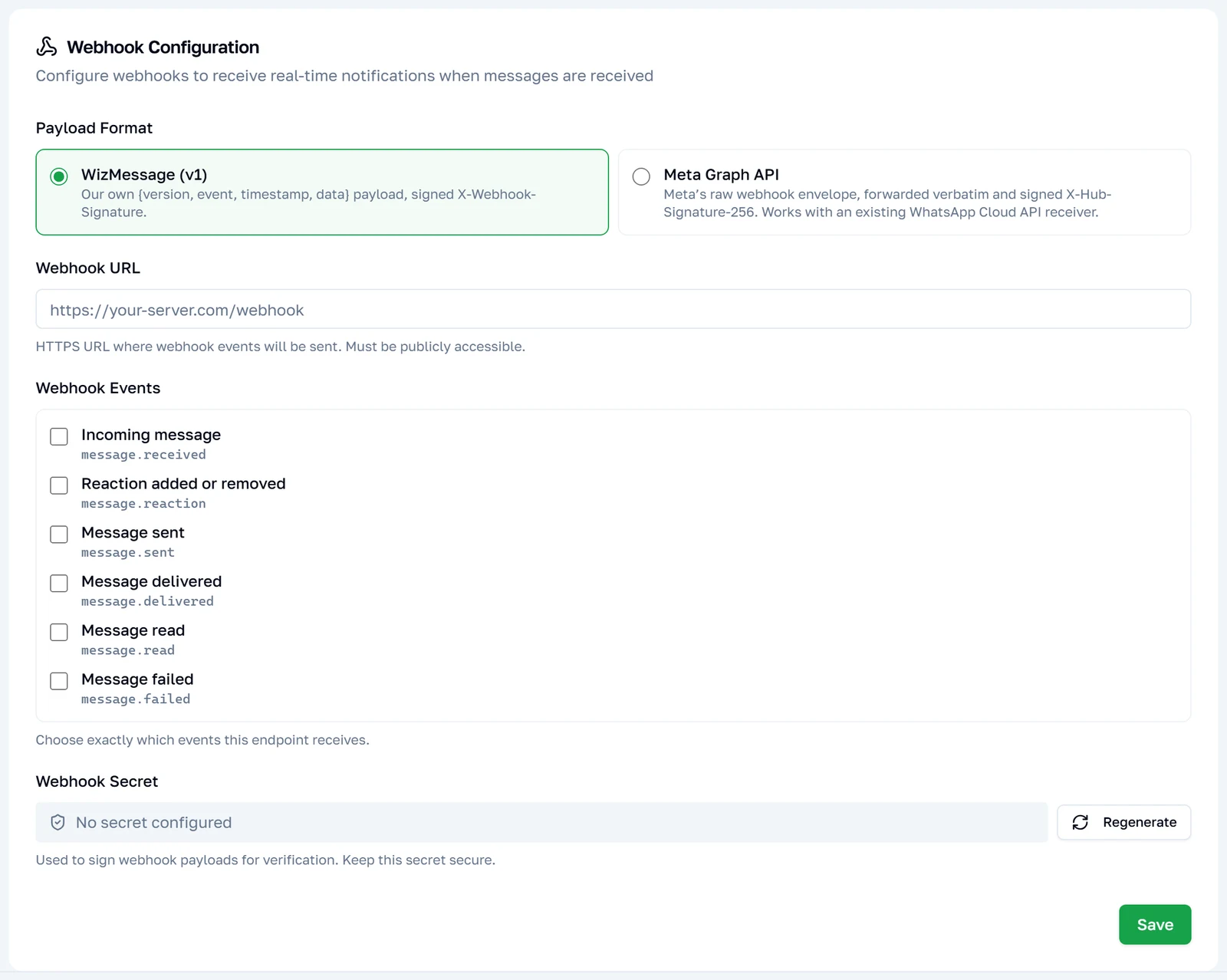
Choose Meta Graph and your endpoint stops receiving our {version, event, timestamp, data} payload and starts receiving the envelope Meta sent us, forwarded verbatim — one delivery per change.
{
	"object": "whatsapp_business_account",
	"entry": [
		{
			"id": "102290129340398",
			"time": 1770000123,
			"changes": [
				{
					"value": {
						"messaging_product": "whatsapp",
						"metadata": {
							"display_phone_number": "15550783881",
							"phone_number_id": "106540352242922"
						},
						"contacts": [{ "profile": { "name": "Priya Sharma" }, "wa_id": "919876543210" }],
						"messages": [
							{
								"from": "919876543210",
								"id": "wamid.HBgMOTE5ODc2NTQzMjEwFQIAEhgg…",
								"timestamp": "1770000123",
								"type": "text",
								"text": { "body": "Has it shipped yet?" }
							}
						]
					},
					"field": "messages"
				}
			]
		}
	]
}
If you already have a Cloud API webhook handler, that is the shape it is written for.
Switching format also changes what the tab asks you for: the event checkboxes are replaced by Meta's own field names, and a verify token appears.
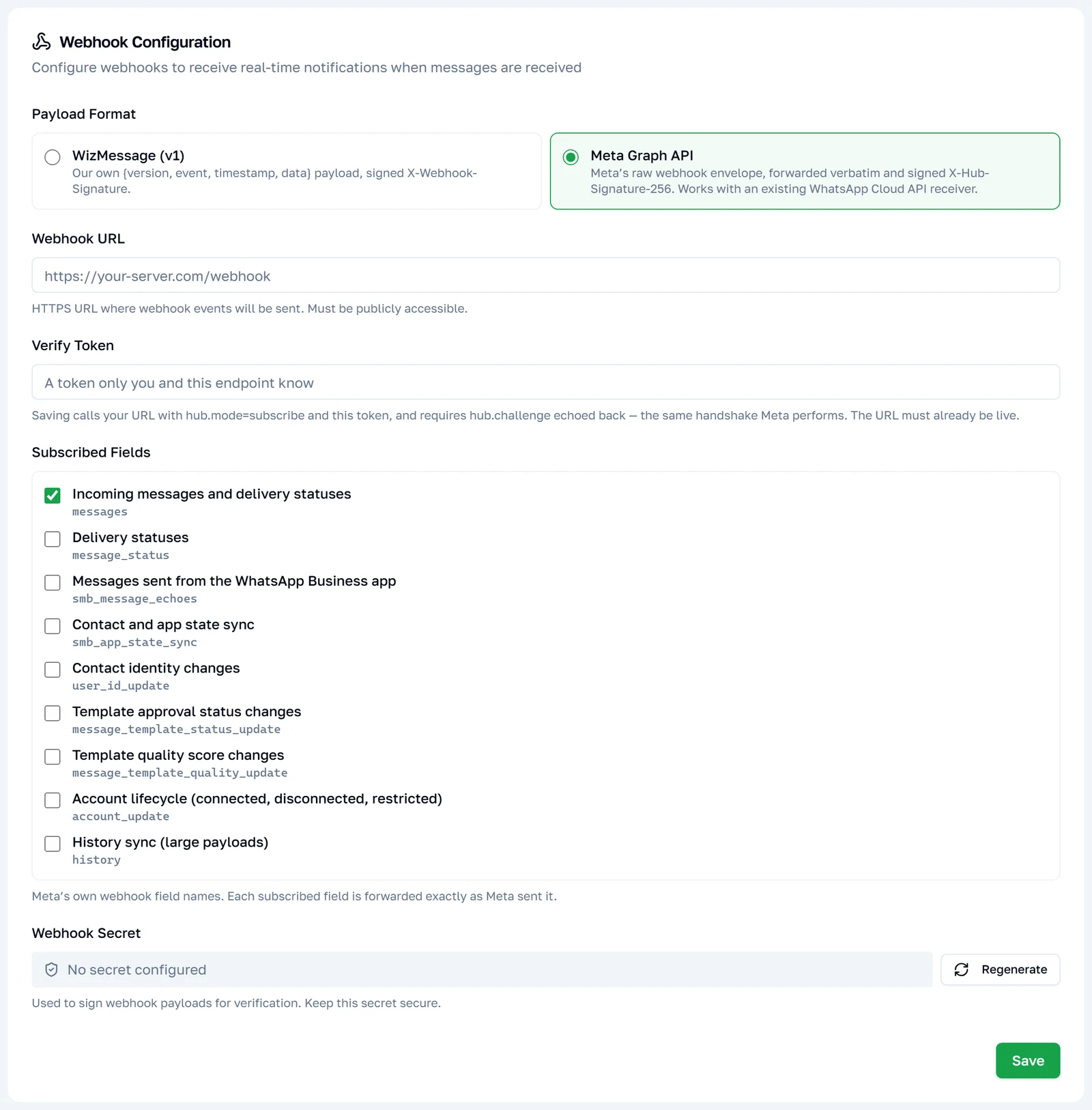
Before you can save one
Three things are required, and the dashboard will tell you which is missing:
- A webhook secret. It is the only thing keying
X-Hub-Signature-256, so without it a delivery would be unsigned and unverifiable. Generate one on the key's Webhooks tab. - A verify token. Any string you choose; your endpoint must know it too.
- A URL that is already answering. See below.
The verification handshake
When you save, we call your URL exactly as Meta would:
GET https://your-server.example/webhooks
	?hub.mode=subscribe
	&hub.verify_token=<the token you set>
	&hub.challenge=482910337
Your endpoint must check that hub.verify_token matches what you configured, then reply 200 with hub.challenge as the entire response body — no JSON wrapper, no quotes, nothing else. The challenge is a 9-digit number, so a handler that does parseInt before echoing round-trips it unchanged.
If the challenge does not come back exactly, the save is refused and nothing is stored. This is what stops someone pointing our delivery queue at a URL they do not control.
// express
app.get('/webhooks', (req, res) => {
	if (req.query['hub.mode'] === 'subscribe' && req.query['hub.verify_token'] === VERIFY_TOKEN) {
		return res.status(200).send(req.query['hub.challenge'])
	}
	res.sendStatus(403)
})
Verifying the signature
Every delivery carries X-Hub-Signature-256, computed the way Meta computes it: HMAC-SHA256 of the raw request body, keyed on your webhook secret, hex, prefixed sha256=.
| Header | Value |
|---|---|
X-Hub-Signature-256 | sha256= + HMAC-SHA256 of the raw body, keyed on your webhook secret, lowercase hex. |
X-Webhook-Event | meta.<field> — which field this delivery carries. |
X-Webhook-Id | Unique id for this delivery attempt. Dedupe on it. |
User-Agent | facebookplatform/1.0 (+http://developers.facebook.com) |
Note: This is not the same derivation as the WizMessage format. That one signs
timestamp + "." + rawBodyand sends the timestamp in its own header; this one signs the body alone, with no timestamp anywhere. If you are running both formats against one server, keep the two verifiers separate — a shared one will fail on whichever it was not written for.
Sign the raw bytes as received. Parsing the JSON and re-serialising changes key order and spacing, and the signature will never match.
const crypto = require('node:crypto')

// express: app.post('/webhooks', express.raw({ type: 'application/json' }), ...)
function verify(req) {
	const provided = req.get('X-Hub-Signature-256') || ''
	if (!provided.startsWith('sha256=')) return false

	const expected = crypto
		.createHmac('sha256', WEBHOOK_SECRET)
		.update(req.body) // the raw Buffer, not a parsed object
		.digest('hex')

	// Constant-time compare — a plain === leaks timing information.
	const a = Buffer.from(expected, 'hex')
	const b = Buffer.from(provided.slice('sha256='.length), 'hex')
	return a.length === b.length && crypto.timingSafeEqual(a, b)
}
Choosing what you receive
The WizMessage format has you tick events. This one has you tick Meta's field names, matching what you would subscribe to in Meta's own App Dashboard.
| Field | What arrives |
|---|---|
messages | Inbound messages and delivery statuses. Read the note below. |
message_status | Delivery statuses, as their own field. |
smb_message_echoes | Messages the business sent from the WhatsApp Business app on their phone. |
smb_app_state_sync | Address-book changes made on that phone. |
user_id_update | A contact's WhatsApp identity changed. |
message_template_status_update | A template was approved, rejected or paused. |
message_template_quality_update | A template's quality score moved. |
account_update | The WhatsApp account was connected, disconnected, restricted or offboarded. |
history | Past conversations, during the initial sync. Large payloads — opt in only if you want them. |
New graph webhooks start subscribed to messages alone. Clearing every field switches deliveries off without deleting the configuration.
Note:
messagesalready carries delivery statuses. Meta sends both under"field": "messages"— inbound messages in amessagesarray, delivery reports in astatusesarray on the same value object. So the default subscription is enough to correlate thewamidyou got back from a send.message_statusis an additional field, not the one you need for basic status tracking. Readvalue.statusesbefore assuming you are missing a subscription.
Three things that differ from the WizMessage format
Worth reading if you are moving an integration across, because each one silently changes what shows up.
- Delivery is not gated on the chatbot system. On the WizMessage format, inbound messages only reach your endpoint when the account's chatbot system is set to Webhook. The Graph format ignores that setting entirely — configuring a URL and subscribing to a field is the whole opt-in.
- You receive
status: "sent"and campaign statuses. The WizMessage format drops both deliberately. Here you get what Meta sent, which means noticeably more status traffic on an account running bulk campaigns. - There is no synthetic
message.sent. The WizMessage format manufactures one for messages sent from the API, the dashboard or the phone. Meta covers the same ground withsmb_message_echoesand thesentstatus, so nothing is invented here.
Delivery, retries and switching off
Identical to the WizMessage format — the same table applies. In short: we wait 10 seconds, never follow redirects, retry 5xx/408/429/timeouts five times with backoff, never retry other 4xx, and treat 410 Gone as "switch this webhook off".
Deliveries are at-least-once. Dedupe on X-Webhook-Id, and reply 2xx quickly.
Trying it without writing code
The key's Test API dialog has an API Format control. Set it to Meta Graph and the endpoint picker is replaced by the real target for your account — POST /v26.0/{your phone number id}/messages — with a Meta-shaped body pre-filled.
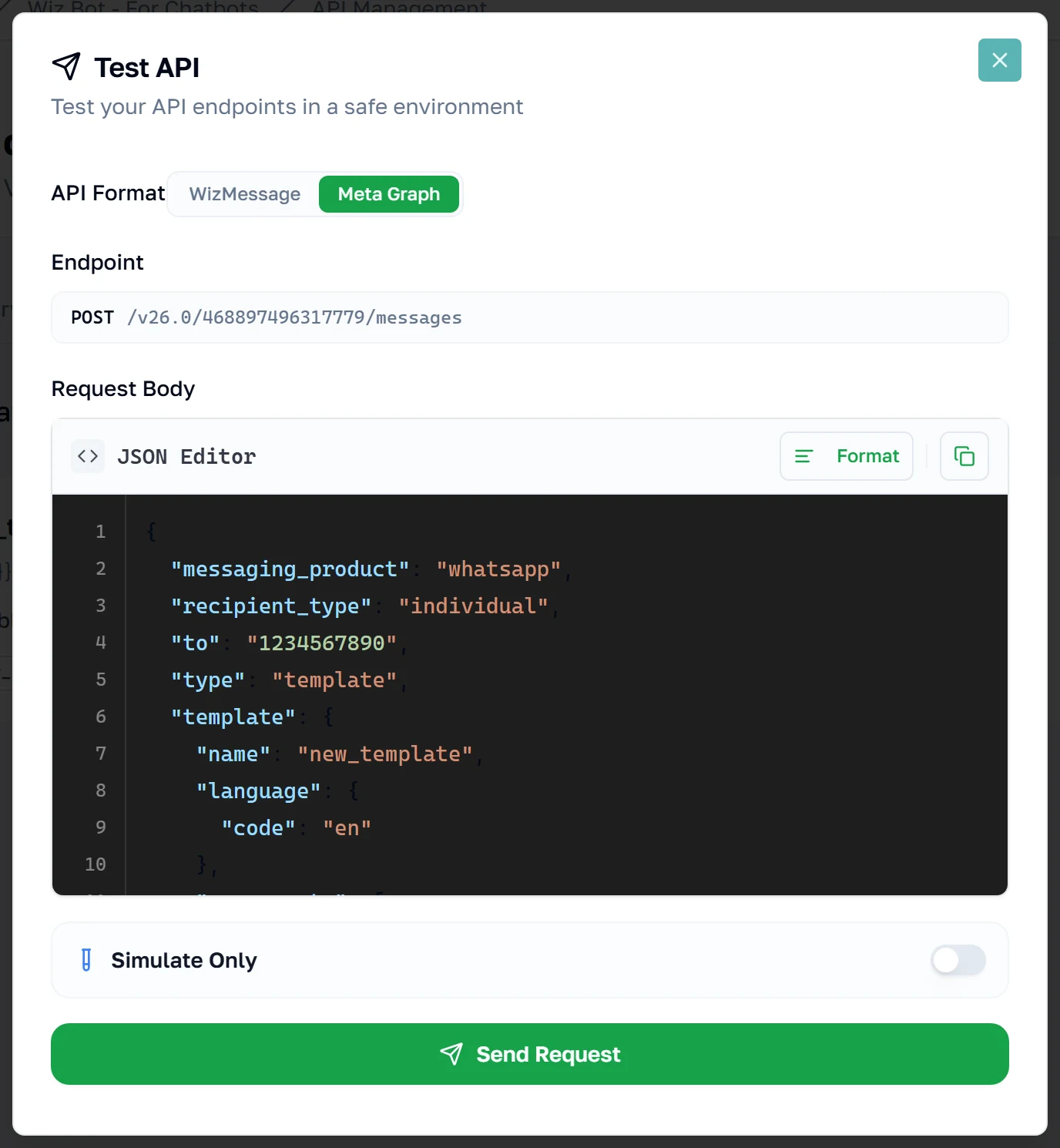
"Simulate Only" echoes the request back without contacting Meta; switching to Send Real Message sends it and shows you Meta's actual response, error envelope and all.
The dialog targets POST /{phone-number-id}/messages and nothing else, so the account-management endpoints are not reachable from it — try those with curl or your own client.
Get code carries the same control, so the generated snippet targets whichever surface you pick, in any of the eight languages. Leave "Require signature" off on a key you intend to use here — with it on, the generated Graph snippet also signs the request, which is the one thing an unmodified Cloud API client cannot do.